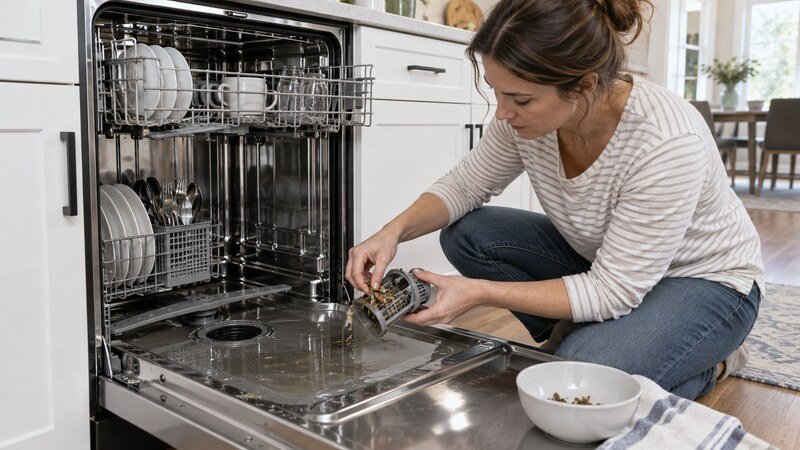
If your Samsung dishwasher is not draining, turn it off and check for a canceled cycle, a dirty filter or drain area, a blocked sink or garbage disposal connection, a clogged air gap, and a kinked drain hose. Samsung identifies 5C, 5E, SC, and SE as drain-error families on supported models. OC or OE can relate to overflow or drain conditions. Persistent standing water after external checks may require drain-pump, check-valve, sensor, wiring, or control diagnosis.
Safety first: Stop the appliance and disconnect power before removing a filter cover, access panel, hose, or internal part. Never test energized components. For gas dryers, wiring, a repeatedly tripping breaker, a burning smell, a hot cord, a leak, or major disassembly, use a qualified technician.
What the Symptom Tells You
- Water only in the deep sump below the filter: a small amount may be normal.
- Visible pool across the tub floor: drainage is incomplete.
- 5C/5E/SC/SE: focus on the drain route.
- New disposal or recent installation: confirm the disposal knockout and hose routing.
Samsung Dishwasher Not Draining? Step-by-Step Diagnosis
1. Run Cancel and Drain Correctly
Close and latch the door, then use the model’s Cancel/Drain function. Many Samsung models require holding Start or Cancel for several seconds, but the label varies. Listen for the pump. Silence, humming, or water returning after the pump stops are different clues.
2. Turn Off Power Before Reaching Inside
Switch the dishwasher off at the breaker before removing the lower rack or filter. Wear gloves because broken glass can hide in standing water. Scoop excess water with a cup or towels so the drain area can be inspected without spilling onto electrical parts.
3. Clean the Filter and Drain Area
Remove the filter only as described for the model. Rinse food debris away and check the exposed sump area for labels, bones, glass, or other objects. Do not force a cover or reach into the pump impeller. Some Samsung filter assemblies differ significantly.
4. Check the Sink and Garbage Disposal
Run the sink faucet and confirm the basin drains freely. If the dishwasher connects to a disposal, make sure the disposal is clear and the dishwasher inlet knockout was removed during installation. Disconnecting plumbing can leak; use a plumber if access is uncertain.
5. Clean the Countertop Air Gap
If an air gap is installed beside the faucet, remove its cap with dishwasher power off and clear visible debris using a small brush. Water discharging from the air gap during a cycle usually points to a restriction downstream. Refit the cap before testing.
6. Inspect Drain-Hose Routing
Look under the sink for a kink, crush, or cabinet item pressing on the corrugated hose. Confirm the required high loop or air-gap arrangement in the installation manual. A hose pushed too far into a standpipe can siphon or restrict flow.
7. Distinguish Drain Error From Overflow Protection
Samsung drain codes commonly include 5C/5E/SC/SE. OC or OE can indicate an overflow or related drain condition on supported models. Do not repeatedly reset a machine that keeps pumping, leaks, or shows an overflow message; shut off power and water.
8. Drain Pump, Check Valve, Sensor, or Control
If the route is clear but the pump only hums, does not run, or cannot move water, an internal obstruction or failed component is possible. Built-in dishwasher removal and electrical testing should be handled by a qualified technician.
Codes and Model-Specific Clues
Samsung’s current US guidance groups 5C, 5E, SC, and SE with drain errors. OC and OE can be associated with overflow or drain conditions. Models that use flashing lights instead of a display require the exact light-pattern chart.
When to Call a Professional
Schedule professional service when the safe external checks do not solve the problem, the same code returns, or diagnosis requires a meter, internal wiring access, appliance removal, gas work, or major disassembly. Stop immediately for smoke, a burning or gas odor, sparking, a hot plug, a repeated breaker trip, water near electrical parts, or severe mechanical noise. Give the technician the full model number, the exact code, when the failure occurs, and whether a basic test cycle changed the symptom.
Related Troubleshooting Guides
These published guides may help you compare the symptom: dishwasher not draining guide, dishwasher drain-path checks, dishwasher filter and cleaning guide.
Frequently Asked Questions
How do I force my Samsung dishwasher to drain?
Use the documented Cancel/Drain control for the exact model, often by holding Start or Cancel. Do not guess a button sequence if the panel differs.
What does 5C mean on a Samsung dishwasher?
It means the dishwasher detected a drain problem on supported models. Check the filter, hose, air gap, sink, and disposal connection.
Why is there water after cleaning the filter?
The drain hose, air gap, disposal, pump, or check valve may still be restricted. A little water deep in the sump can be normal; a pool over the tub floor is not.
Will resetting fix a drain problem?
A reset can clear a temporary control state but cannot remove food debris, a kink, a disposal plug, or a failed pump.
When is standing water an emergency?
Turn off power and water if the dishwasher leaks, overfills, keeps pumping continuously, smells electrical, or sends water onto the floor.
Bottom Line
Start with the checks that do not require disassembly: note the cycle behavior, correct the load or installation issue, inspect the accessible airflow or drainage path, and perform only the documented reset for the exact model. If the problem returns, stop guessing and have the relevant safety, drive, sensor, wiring, and control components tested professionally.