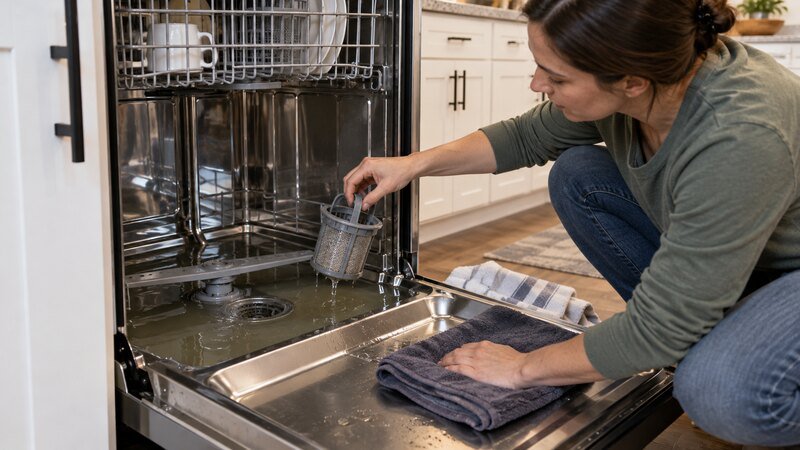
The Samsung dishwasher 5C error means the dishwasher is not draining within the expected time. Do not repeatedly clear the code without correcting the cause. Start with the external supply or drain checks that apply to this code, then stop before internal wiring, pumps, motors, valves, or live electrical measurements.
This guide focuses on Samsung equipment and the stated symptom. Model designs vary, so compare every step with the owner manual for the full model number before removing a cover or ordering a part.
What the Symptoms Tell You
- Water remains above the filter area after the cycle stops.
- The display may show 5E, SC, or SE on related Samsung platforms.
- A newly installed disposal can cause the code if its dishwasher inlet plug was not removed.
What This Error Code Does—and Does Not—Tell You
The code identifies the system that failed to complete a monitored action; it does not prove that one particular part is defective. A supply restriction, installation issue, obstruction, loose connection, sensor reading, or control problem can create the same display. Note when the code appears—before filling, during washing, while draining, or before spinning—because timing narrows the diagnosis without opening the appliance.
Before the Test Cycle
Photograph the display, locate the full model number, and read the model’s owner manual. Correct only the accessible external cause, restore power and any water supply, then run one supervised empty or lightly loaded test. Stay nearby and stop immediately for leaking, grinding, burning odor, repeated breaker trips, or an unusually hot cord or plug.
Safe Step-by-Step Diagnosis
1. Turn off power
Switch the dishwasher breaker off before touching the filter, drain hose, air gap, or disposal connection.
2. Remove standing water safely
Use towels or a cup if needed so the filter area can be inspected without splashing electrical components.
3. Clean the accessible filter
Remove food debris according to the manual; filter designs vary and some should not be forced.
4. Check the sink-side path
Clear the air gap if fitted and confirm the garbage disposal drains freely.
5. Inspect drain-hose routing
Look for kinks and verify the required high loop or air-gap arrangement.
6. Reset once
After correction, disconnect power for one to five minutes and run a short empty cycle.
Most Likely Causes
Blocked filter or sump
Food, labels, glass, or grease can slow water leaving the tub.
Kinked or incorrectly routed hose
A pinched hose or missing high loop can cause slow drain or backflow.
Blocked air gap or disposal inlet
Sink-side restrictions are common after plumbing or disposal work.
Clogged drain hose
Grease and debris can restrict the hose beyond the visible section.
Drain-pump obstruction or failure
A humming pump may be jammed; a silent pump can have an electrical or control fault.
Check valve problem
A failed check valve can allow dirty water to return.
Wiring or control fault
Testing the pump circuit requires the unit disconnected and model-specific information.
Reset or Restart Procedure
Samsung states that a reset clears stored codes but does not fix the drain cause. Turn off power for one to five minutes only after completing the safe checks.
Components Related to This Problem
Related parts include the filter assembly, drain hose, check valve, drain pump, level sensor, wiring harness, and control board. Do not reach into a pump without disconnecting power.
When to Call a Professional
Stop troubleshooting and arrange qualified service if you smell gas, see scorched wiring, repeatedly trip a breaker, find water near electrical parts, or need to remove sealed panels. Internal electrical tests must be performed with power disconnected and by someone trained to follow the model-specific service information.
Also call for service when the same code or symptom returns after one safe reset and the external checks pass. Give the technician the model number, complete error code, cycle used, and when the problem occurs.
Related Troubleshooting Guides
- Samsung Dishwasher Not Draining?
- Dishwasher Not Draining? 8 Safe Fixes
- Samsung Dishwasher LC or LE Error
Frequently Asked Questions
What does 5C mean on a Samsung dishwasher?
It is a drain error. Related models may display 5E, SC, or SE.
Can a garbage disposal cause 5C?
Yes. A blocked disposal or an intact knockout plug on a new disposal can stop dishwasher drainage.
How much water is normal at the bottom?
A small amount below the filter can be normal, but visible standing water across the tub with 5C is not.
Will resetting clear 5C?
It may clear the display temporarily, but the code returns if the drain path or pump problem remains.
When should I stop?
Stop for leaks, broken glass you cannot remove safely, a repeated pump hum, burning odor, or any internal electrical test.
Bottom Line
Begin with settings, loading, accessible filters or vents, hoses, doors, and external supplies. Stop before live-voltage, gas, sealed refrigeration, or internal motor and control work. A careful symptom record is more useful than replacing a part based on the code or headline alone.