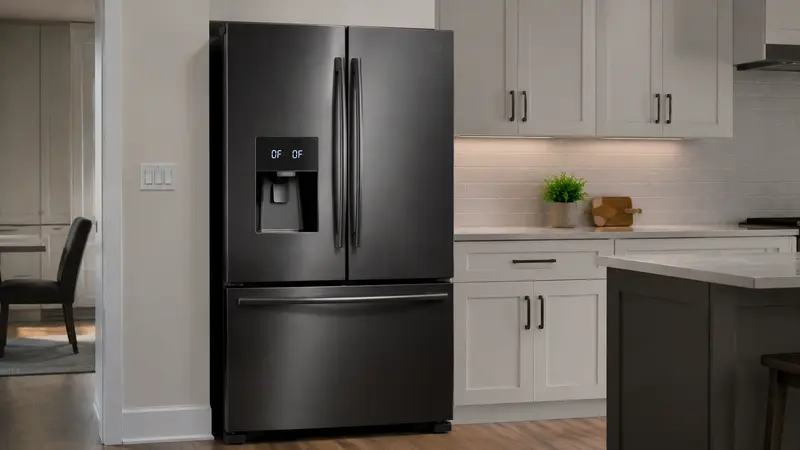
If your Samsung refrigerator shows OF OF, O FF, or OFF OFF, it is usually in Cooling Off mode, also called Demo or Shop mode—not reporting a conventional fault code.
The lights, display, and fans may appear to work while the compressor, ice maker, dispenser, and cooling functions are disabled. Turning Cooling Off mode off should remove the message and restart cooling.
Important: Cooling Off mode is not the same as a refrigeration-system failure. Confirm the display and model instructions before arranging a repair.
What Is Samsung Cooling Off Mode?
Cooling Off mode allows the refrigerator to demonstrate its display, lights, and some controls without actively cooling the compartments.
Samsung notes that supported models may show OF OF or O FF while the feature is enabled.
How to Turn Off OF OF on a Samsung Refrigerator
1. Confirm the Exact Display
Look carefully at the panel.
If it shows OF OF, O FF, or a similar OFF indication, compare it with the Cooling Off section of the manual for your exact model.
2. Use the Correct Panel Combination
Samsung refrigerators do not all use the same button labels, so unlock the panel first if necessary and compare it with the Cooling Off section of the manual.
- On many external panels, press and hold the top two buttons on the left together for about 5–8 seconds until a distinct chime sounds.
- If OF OF remains and the model’s instructions show a three-button method, repeat using the two indicated left buttons plus the specified upper-right button.
- Wait a few seconds. The OF OF or O FF message should disappear and normal temperature settings should return.
Do not keep trying random combinations. Family Hub, BESPOKE, convertible, and internal-panel models can use different controls.
3. Family Hub Models May Use the Screen
Some Family Hub refrigerators allow Cooling Off mode to be changed through the Fridge Manager settings.
Use the on-screen instructions rather than guessing at physical buttons.
4. BESPOKE and Convertible Models Can Differ
Samsung’s BESPOKE and convertible refrigerators may use different controls.
Follow the exact sequence for the product family you own.
5. Wait for Cooling to Resume
After Cooling Off mode is disabled, the refrigerator does not become cold instantly.
Keep the doors closed as much as possible and allow the appliance time to pull temperatures down.
6. Check Actual Temperatures
Use a refrigerator thermometer if needed.
A common target is around 37°F for the refrigerator compartment and 0°F for the freezer, unless your model’s manual recommends otherwise.
What If OF OF Is Gone but the Refrigerator Still Is Not Cooling?
If the display returns to normal but temperatures do not begin improving, the problem may be unrelated to Demo mode.
Check:
- Temperature settings
- Blocked interior vents
- Door closure
- Heavy frost
- Unusual fan or compressor noises
Then use our Samsung refrigerator not cooling guide for brand-specific checks, or the broader refrigerator troubleshooting guide linked below.
When to Call a Professional
Arrange service if:
- Cooling Off mode cannot be disabled using the correct model procedure.
- The display no longer shows OF OF but the appliance remains warm.
- The refrigerator repeatedly returns to Cooling Off mode.
- You see another error code.
- There are burning smells, damaged wiring, or repeated power problems.
Do not attempt sealed-system or refrigerant repairs yourself.
Frequently Asked Questions
Does unplugging a Samsung refrigerator clear OF OF?
A power cycle may restart the controls, but it does not reliably disable Cooling Off mode. Use the correct panel or screen procedure for the model and confirm that the OF OF display disappears.
Is OF OF an error code?
It is commonly an indication that Cooling Off or Demo mode is active rather than a conventional failure code.
Why are the lights on if the refrigerator is not cooling?
Cooling Off mode is designed to keep display and lighting functions active while disabling refrigeration for showroom use.
Did I accidentally turn Demo mode on?
It is possible to activate the mode through a button combination or settings menu on supported models.
How long will the refrigerator take to cool after Demo mode is disabled?
Cooling is gradual. Allow several hours and minimize door openings while temperatures stabilize.
Related Troubleshooting
If Cooling Off mode is disabled but temperatures stay high, use Refrigerator Not Cooling? 7 Common Causes and What to Check. If the display shows 22E or 22C instead, use the site’s Samsung refrigerator 22E/22C guide.